
Quickvee Pay Help Center
How can we help?
Find answers and step-by-step guidance for using Quickvee Pay.
Browse by topic
Find the help you need
Choose a topic to view guides and instructions.
Start here
Learn the basics and find your way around Quickvee Pay.
Customers & payments
Add customers and create one-time ACH payments.
Recurring & transactions
Set up recurring payments and check transaction status.
Deposits, reports & exceptions
Track deposits, export reports, and review returns and disputes.
Team & settings
Manage team access, business details, and processing options.
Developers
View API guides and reference documentation.
Your first payment
Create a one-time ACH payment
Confirm the customer's bank details, choose whether you're collecting or sending funds, and review the payment summary before submitting.
View the payment guide- 01Confirm the customer
Select the correct customer and bank account.
- 02Choose Collect Payment or Send Payment
Collect moves funds to your business; send moves funds to the customer.
- 03Choose a funding speed
Review timing, fees, and availability.
- 04Review and submit
Confirm the customer, amount, direction, date, and memo.
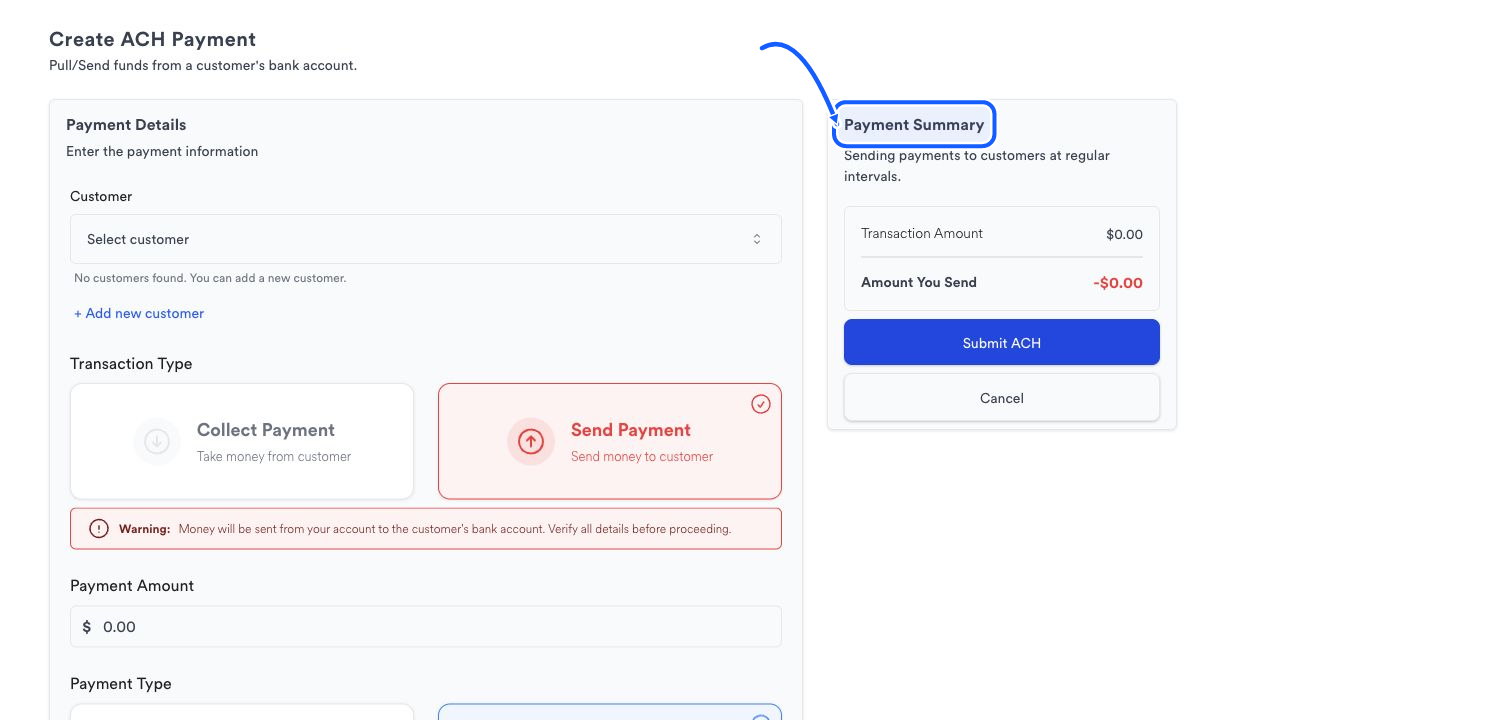
Payment direction
Confirm the payment direction
Collect Payment moves money from the customer to your business. Send Payment moves money from your business to the customer. Check the summary before you submit.